# Install

```bash
sudo apt update && sudo apt upgrade -y
sudo apt install ca-certificates zlib1g-dev libncurses5-dev libgdbm-dev libnss3-dev curl git wget make -y
```

#### Install Python <a href="#install-docker" id="install-docker"></a>

```bash
if ! [ -x "$(command -v python3)" ]; then
sudo apt install python3
python3 --version
else
python3 --version
fi
```

```bash
if ! dpkg -s python3-pip &> /dev/null; then
sudo apt install python3-pip
pip3 --version
else
pip3 --version
fi
```

#### Install docker <a href="#install-docker" id="install-docker"></a>

```bash
# Install Docker
if ! [ -x "$(command -v docker)" ]; then
curl -fsSL https://get.docker.com -o get-docker.sh
sh get-docker.sh
sudo usermod -aG docker $USER
docker --version
else
echo $(docker --version)
fi
```

```bash
# Install Docker Compose
if ! [ -x "$(command -v docker-compose)" ]; then
sudo curl -L "https://github.com/docker/compose/releases/download/v2.2.3/docker-compose-$(uname -s)-$(uname -m)" -o /usr/local/bin/docker-compose 
sudo chmod +x /usr/local/bin/docker-compose 
sudo ln -s /usr/local/bin/docker-compose /usr/bin/docker-compose
docker-compose --version
else
echo $(docker-compose --version)
fi
```

```bash
# Install Go
source <(curl -s https://raw.githubusercontent.com/NodersUA/Scripts/main/system/go)
```

#### Install node

```bash
curl -sSL https://raw.githubusercontent.com/allora-network/allora-chain/main/install.sh | bash -s -- v0.3.0
```

```bash
cp /root/.local/bin/allorad /usr/local/bin/
```

```bash
allorad keys add wallet --keyring-backend test --recover
```

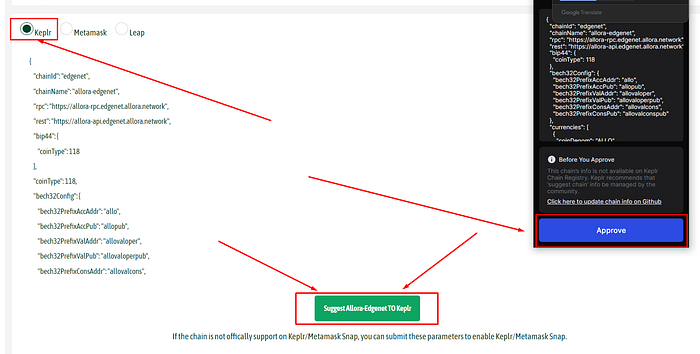
* Go to [explorer](https://explorer.edgenet.allora.network/wallet/suggest) and add the Allora network using Keplr
<figure><img src="https://miro.medium.com/v2/resize:fit:700/1*pw0_gipceAqATXebqIUsWw.png" alt=""><figcaption></figcaption></figure>

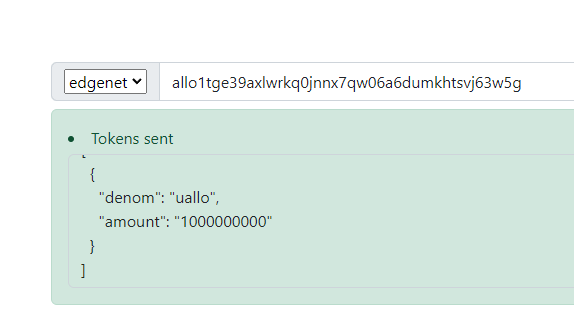
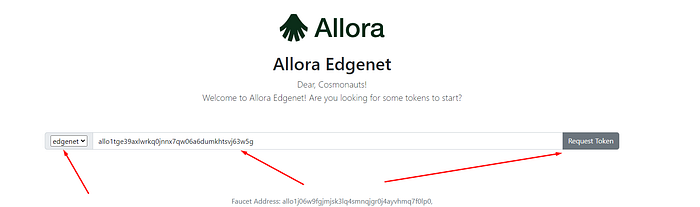
* Go to the [faucet](https://faucet.edgenet.allora.network/) and request $uAllo test tokens
<figure><img src="https://miro.medium.com/v2/resize:fit:700/1*uNwRL94FPGxhxBz6EPGYmg.png" alt=""><figcaption></figcaption></figure>

<figure><img src="https://miro.medium.com/v2/resize:fit:574/1*EaVBVYUS6XrvvT0bHdhohQ.png" alt=""><figcaption></figcaption></figure>

```bash
git clone https://github.com/allora-network/allora-huggingface-walkthrough
cd allora-huggingface-walkthrough
```

```bash
MNEMONIC="Yoor seed phraph from keplr"
```

```bash
sudo tee ~/allora-huggingface-walkthrough/config.json > /dev/null <<EOF
{
   "wallet": {
       "addressKeyName": "wallet",
       "addressRestoreMnemonic": "$MNEMONIC",
       "alloraHomeDir": "/root/.allorad",
       "gas": "auto",
       "gasAdjustment": 2.0,
       "gasPrices": 10,
       "maxFees": 25000000,
       "nodeRpc": "https://allora-testnet-rpc.itrocket.net/",
       "maxRetries": 3,
       "delay": 5,
       "submitTx": true
   },
   "worker": [
       {
           "topicId": 1,
           "inferenceEntrypointName": "api-worker-reputer",
           "loopSeconds": 1,
           "parameters": {
               "InferenceEndpoint": "http://inference:8000/inference/{Token}",
               "Token": "ETH"
           }
       },
       {
           "topicId": 2,
           "inferenceEntrypointName": "api-worker-reputer",
           "loopSeconds": 3,
           "parameters": {
               "InferenceEndpoint": "http://inference:8000/inference/{Token}",
               "Token": "ETH"
           }
       },
       {
           "topicId": 3,
           "inferenceEntrypointName": "api-worker-reputer",
           "loopSeconds": 5,
           "parameters": {
               "InferenceEndpoint": "http://inference:8000/inference/{Token}",
               "Token": "BTC"
           }
       },
       {
           "topicId": 4,
           "inferenceEntrypointName": "api-worker-reputer",
           "loopSeconds": 2,
           "parameters": {
               "InferenceEndpoint": "http://inference:8000/inference/{Token}",
               "Token": "BTC"
           }
       },
       {
           "topicId": 5,
           "inferenceEntrypointName": "api-worker-reputer",
           "loopSeconds": 4,
           "parameters": {
               "InferenceEndpoint": "http://inference:8000/inference/{Token}",
               "Token": "SOL"
           }
       },
       {
           "topicId": 6,
           "inferenceEntrypointName": "api-worker-reputer",
           "loopSeconds": 5,
           "parameters": {
               "InferenceEndpoint": "http://inference:8000/inference/{Token}",
               "Token": "SOL"
           }
       },
       {
           "topicId": 7,
           "inferenceEntrypointName": "api-worker-reputer",
           "loopSeconds": 2,
           "parameters": {
               "InferenceEndpoint": "http://inference:8000/inference/{Token}",
               "Token": "ETH"
           }
       },
       {
           "topicId": 8,
           "inferenceEntrypointName": "api-worker-reputer",
           "loopSeconds": 3,
           "parameters": {
               "InferenceEndpoint": "http://inference:8000/inference/{Token}",
               "Token": "BNB"
           }
       },
       {
           "topicId": 9,
           "inferenceEntrypointName": "api-worker-reputer",
           "loopSeconds": 5,
           "parameters": {
               "InferenceEndpoint": "http://inference:8000/inference/{Token}",
               "Token": "ARB"
           }
       }
       
   ]
}
EOF
```

```bash
sed -i 's/<Your Coingecko API key>/CG-RBebgnRtVuNPFNAFL82BB3vx/' app.py
```

```bash
chmod +x init.config
./init.config
```

```bash
docker compose up --build -d
docker logs -fn100 worker
```


---

# Agent Instructions: Querying This Documentation

If you need additional information that is not directly available in this page, you can query the documentation dynamically by asking a question.

Perform an HTTP GET request on the current page URL with the `ask` query parameter:

```
GET https://nodersua.gitbook.io/about-nodersua/testnet/allora/install.md?ask=<question>
```

The question should be specific, self-contained, and written in natural language.
The response will contain a direct answer to the question and relevant excerpts and sources from the documentation.

Use this mechanism when the answer is not explicitly present in the current page, you need clarification or additional context, or you want to retrieve related documentation sections.